/brand/gencreator-mark.svg
Vector-first identity
Use the SVG mark or wordmark for identity. Rendered glow images can be applications, never the master logo.
One-color, 16 px, 32 px, app icon, social avatar, footer, and light-on-dark checks.
GenCreator needs a brand media system, not random posts: logo proof, type discipline, social formats, motion frames, gratitude, and assistant-readable production rules in one contract.
Brand media engine
One source signal becomes a format, proof object, motion frame, and approval-safe route.
Signal
Source pattern
System
Operating rule
Proof
Visible artifact
Action
Route and approval
Output stack: LinkedIn carousel, Instagram Reel, TikTok clip, YouTube Short, X thread, newsletter card, community proof card.
Ready for critic7
Carousel, short video, long build, image, thread, newsletter, and community proof.
5
Vector master, avatar, wordmark, icon primitive sheet, and social template sheet.
3
Signal reveal, carousel motion graphic, and delivery-room confirmation.
1
Public output stays draft-only until proof, source credit, crop, and support boundary are checked.
Logo and type foundation
The master identity stays vector-first. Geist becomes the primary product and social font. Sentence case, normal spacing, and proof-led layouts make the brand feel confident without shouting.
/brand/gencreator-mark.svg
Use the SVG mark or wordmark for identity. Rendered glow images can be applications, never the master logo.
One-color, 16 px, 32 px, app icon, social avatar, footer, and light-on-dark checks.
/brand/gencreator-mark-mono.svg
Use the mono mark on ink for avatars, with one blue-cyan-green edge. No tiny tagline, no photo collage, no generated emblem.
Recognizable at 32 px on X, YouTube comments, Instagram, TikTok, LinkedIn, and browser favicons.
/brand/gencreator-wordmark.svg
Use the horizontal wordmark for decks, article covers, YouTube lower thirds, delivery rooms, and media kits.
Readable in 1200 x 630 OG crops and 16:9 video end cards.
/brand/gencreator-icon-sheet.svg
Use the creation, activation, MCP, community, approval, gratitude, and Studio primitives as product symbols.
Each icon explains one product behavior without decorative illustration.
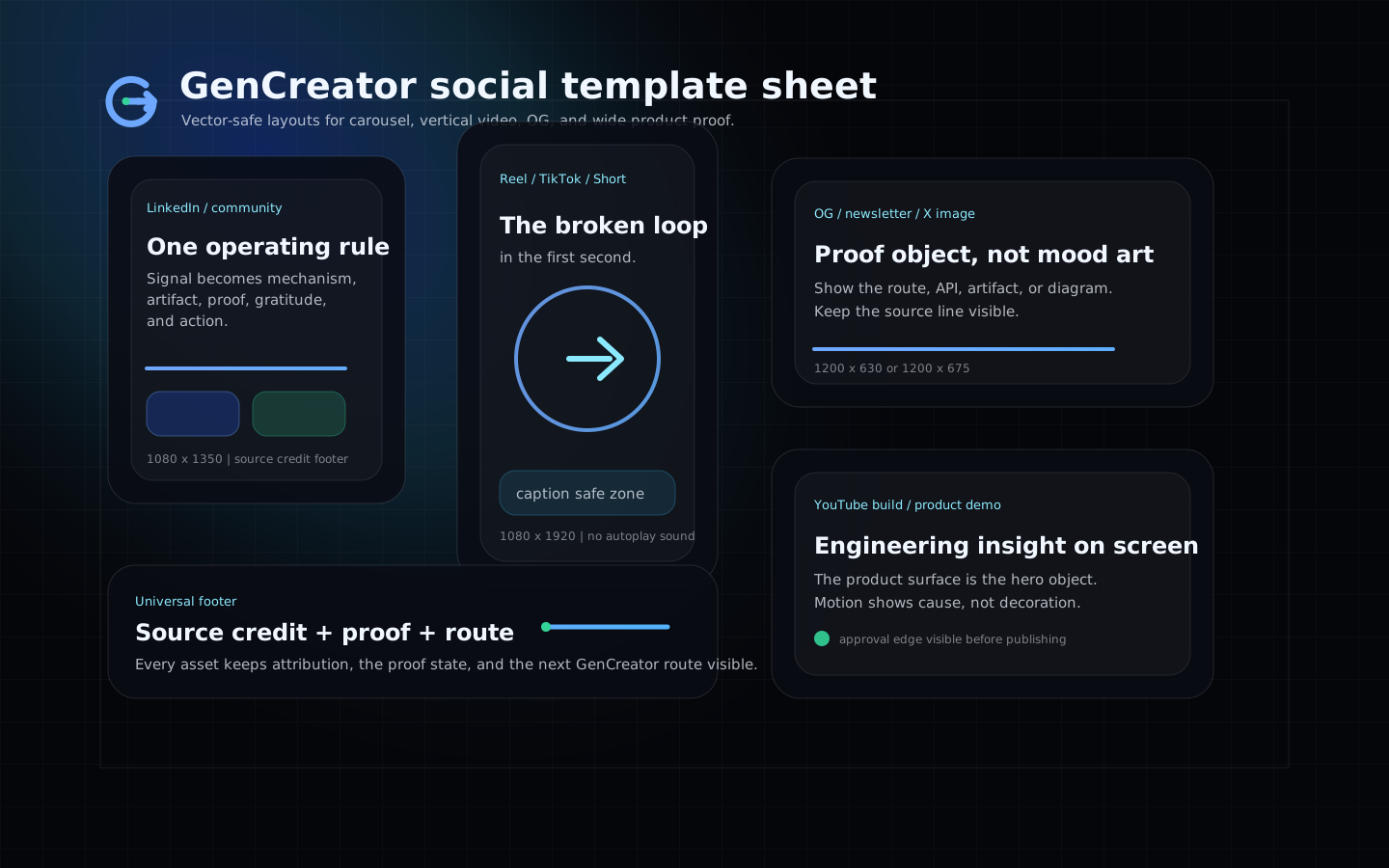
/brand/gencreator-social-template-sheet.svg
Use the social sheet as the master layout reference for carousel, vertical video, OG, and wide video framing.
The same thesis, proof, CTA, source credit, and approval footer survive all four crops.
Use Geist for display and body so the brand feels technical, clear, and premium rather than course-like.
Website, product UI, social templates, decks, and video captions.
Do not style labels as all caps by default. Use sentence case, normal letter spacing, and weight changes for hierarchy.
Cards, buttons, captions, navigation, carousels, subtitles, and thumbnails.
Use Fraunces only as a quiet editorial accent in essays or gratitude/source-credit moments, never as the main UI font.
Article pull lines, source notes, or one premium quote frame per campaign.
Video captions must be large enough for mobile, carry the hook without sound, and never sit under platform UI chrome.
Reels, TikTok, Shorts, LinkedIn video, and X video.
If a claim does not fit in a carousel frame, split it into another slide. Never compress tracking or force paragraph text into a title slot.
Carousel slides, thumbnails, OG images, and story frames.
Platform format matrix
The same strategic unit moves across LinkedIn carousels, Instagram, TikTok, Shorts, YouTube builds, X, newsletter, and GenCreator.community without losing the hook, proof, source credit, or route.
1080 x 1350
Teach one mechanism and route the reader to /brand/social, /products/offers, or /community/os.
A creator system claim, not a vague inspirational line.
Save the operating rule or generate the product offer packet.
1080 x 1080
Make the brand remixable through clean frames, proof, and gratitude.
The artifact or visual proof, then the lesson.
Comment with the artifact you want to turn into a system.
1080 x 1920
15 to 45 seconds for most product proof clips
Show signal to system to proof, with product UI as the hero object.
The broken creator workflow in the first second.
Open the activation plan or join the proof loop.
1080 x 1920
9 to 35 seconds for most creator insight clips
Turn one practical AI creator insight into a visible product loop.
Name the false default, then show the operating replacement.
Ask the assistant for a brand-social packet.
1080 x 1920
30 to 90 seconds unless the proof needs more room
Convert research and product demos into a repeatable short-form series.
One claim, one system, one proof object.
Watch the full build or inspect the API contract.
1920 x 1080
8 to 18 minutes for build-and-explain episodes
Make the engineering insight and operating frame credible through a real build.
The build outcome and why it matters for creator operators.
Download the markdown contract or open the live product route.
1200 x 1200
Anchor a thread with a clean visual that survives timeline compression.
A direct operating rule people can quote.
Reply with the workflow to turn into a product packet.
1200 x 1200 image anchor
Move from signal to mechanism to product route without hype.
The contrarian system claim in plain language.
Open the API or save the prompt.
1200 x 675
Move weekly research into the owned audience with source credit.
The research question and the operating decision.
Open the lab report or build the weekly proof loop.
1080 x 1350
Turn social output into community practice and compounding examples.
The finished artifact and the decision needed.
Review one decision, not the whole creator.
Carousel and video systems
Each carousel and motion frame has a job: source, mechanism, artifact, proof, gratitude, and action. That is how GenCreator becomes culture-shaping without drifting into vague AI content.
Every slide uses one object: source, mechanism, product route, or proof. No abstract filler.
The final slide cites source, artifact, metric, and next route.
1
Name the pattern observed in public culture or product work.
2
State what creators usually do that breaks the system.
3
Show the operating principle behind the signal.
4
Show the GenCreator route, prompt, API, or UI that makes it usable.
5
Name what changed, what shipped, or what must be measured next.
6
Credit the source, collaborator, customer, or teacher.
7
Route to Activation Engine, Product Offer System, or community proof loop.
Use the product route, delivery frame, and checkout truth as the visual spine.
Do not imply checkout or support is live unless the manifest confirms it.
1
Name the buyer bottleneck.
2
Show what happens in the first ten minutes.
3
Show files, API, room, or packet.
4
State what the offer does not include.
5
Route to community or Studio only when proof exists.
Frames look like an operating manual: role, tool mode, prompt, approval task, proof.
Every agent claim names mode: read-only, draft-only, or approval-required.
1
Name the assistant job.
2
Name what the assistant can and cannot do.
3
Show the resource or tool the assistant reads.
4
Give one starter prompt.
5
Show the human review point.
6
Name the finished artifact.
Hero, Reel, TikTok, Short, and product demo opener
0.0s
A scattered signal field appears.
Subtle grid wake and one cyan line finds the source.
1.2s
The signal locks into the GenCreator mark.
Mark stroke draws once, then settles.
2.4s
Three product routes appear.
Cards rise in sequence: offer, campaign, community.
4.2s
A proof artifact replaces the mood frame.
Product UI slides forward; source credit stays visible.
6.6s
Approval edge turns green.
One line completes, then loop returns to the signal field.
Opt-in glass click, low sine confirmation, and a soft approval tone. No autoplay.
Static four-frame poster: signal, system, artifact, approval.
LinkedIn video, Instagram Reel, YouTube Short
0.0s
Hook slide fills the screen.
No bounce; a precise mask reveals the thesis.
2.0s
False default slide.
Old workflow dims while the system rail appears.
6.0s
Mechanism slide.
Diagram lines animate in the reading order.
12.0s
Product proof slide.
Live route screenshot or SVG template takes over.
18.0s
Action slide.
CTA and source credit settle into a stable end frame.
Short page-turn ticks under voiceover; confirmation tone only on final proof.
Export the same sequence as static carousel slides.
Checkout success, product delivery, paid offer preview
0.0s
Payment confirmation enters as a quiet receipt.
Liquid edge moves once, then rests.
1.5s
Setup packet opens.
Modules appear from left to right with no layout shift.
3.5s
Assistant prompt and approval policy are visible.
Glow follows the active step.
6.0s
Community or Studio route is named.
Green approval line completes the frame.
Source, signal, approval triad. User-enabled only.
Static delivery receipt with next action and support boundary.
GTM packaging
One substantial idea becomes a lab report, carousel, short clips, X thread, newsletter card, and community proof prompt.
Saved posts, replies with artifacts, community proof submissions, and offer clicks.
Open routeOne Product Offer System packet becomes pricing proof, delivery preview, launch carousel, short demo, and checkout handoff.
Activation plans generated, offer API opens, checkout handoffs, and support-boundary questions reduced.
Open routeOne member artifact becomes a review request, proof card, digest example, and next product route.
Artifacts submitted, decision reviews completed, examples added to the library, and Studio applications with proof.
Open routeOne role file and one MCP resource become a carousel, assistant prompt, approval task, and short demo.
MCP API reads, skill pack downloads, approval tasks created, and Agent Pack checkout intent.
Open routeAssistant-ready packet
MCP now exposes the brand-social resource, generator, and critic prompt so social production can be routed through the same approval-first GenCreator OS.
{
  "resource": "gencreator-brand-social-system",
  "tool": "gencreator.generate_brand_social_packet",
  "prompt": "gencreator.brand_social_system_review"
}Use when turning one source signal into social media assets.
Turn this source signal into a GenCreator brand-social packet. Choose the primary platform, format, hook, false default, mechanism, proof object, gratitude/source credit, CTA, safe-area notes, approval risk, and the route into /products/offers or /community/os.
Use before publishing LinkedIn or Instagram carousel work.
Critique this carousel against the GenCreator standard: first read, artifact specificity, proof, source credit, type size, mobile crop, CTA, support boundary, and whether any claim needs approval or better evidence.
Use before posting a Reel, TikTok, Short, LinkedIn video, or X video.
Critique this short video plan. Check the first three seconds, product proof, caption safe area, sound-off legibility, one motion signature, reduced-motion poster, source credit, approval risk, and next route.
Use when turning research or community work into public content.
Name the sources, collaborators, customers, tools, and teachers this piece should credit. Turn the credit into one visible source line and one relationship-building follow-up.
References and QA
Use for vertical Reels placement, 9:16 creative, and mobile-safe video planning.
Use for carousel card structure, square or vertical feed assets, and sequential storytelling.
Use for TikTok vertical video production, file type, duration, and safe-zone checks.
Use for Shorts orientation and duration planning.
Use for LinkedIn feed, carousel, document, and video delivery constraints.
Use for X image, video, and carousel ratios before building launch assets.